
We triage what other platforms can't
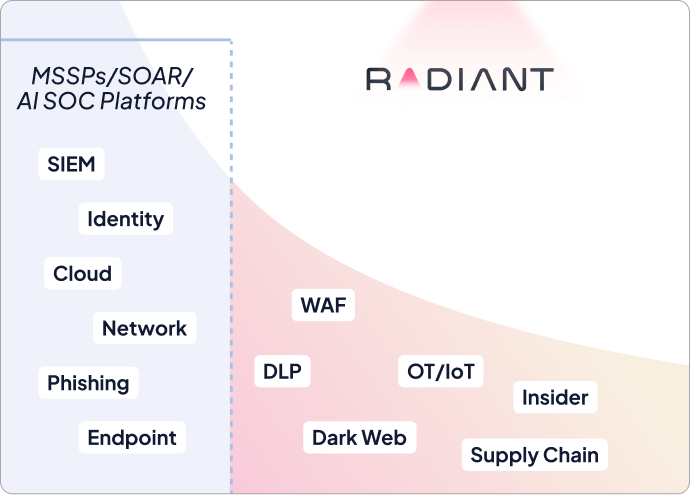
Other AI SOC platforms have coverage ceilings. They rely on pre-defined logic and follow fixed triage questions.
Radiant uses a structured 5-step investigation process designed to handle any alert, from the common to the complex.
Other AI SOC platforms have coverage ceilings. They rely on
pre-defined logic and follow fixed triage questions.
Radiant uses a structured 5-step investigation process designed to handle any alert, from the common to the complex.
Triage any alert with Radiant’s
5-Step Methodology
The triage process: What we do
Radiant follows the same investigative flow a human analyst would: understand → enrich → plan → execute → conclude.
Classification
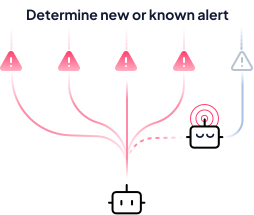
AI interprets the characteristics of a raw alert to determine it’s type of threat, and understand whether it has encountered it before. This determines if a plan will be re-used or generated from scratch in step 3.
Enrich
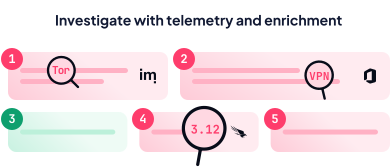
AI automatically pulls in context from across your environment: threat intelligence, identity data, asset information, and more, so your team has everything they need to make a decision without manually stitching data together.
Plan
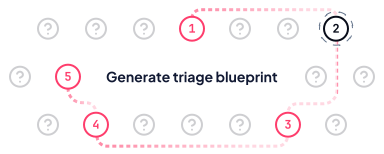
AI plans the structured set of steps that determines exactly how the alert will be investigated. Plans are built dynamically based on: Radiant’s expert knowledge, your unique environment, and context memory.
Execute
AI runs automatically to answer each investigative question, pulling information from your connected security tools, SIEMs, and external data sources without any manual effort from your analysts.
Conclude
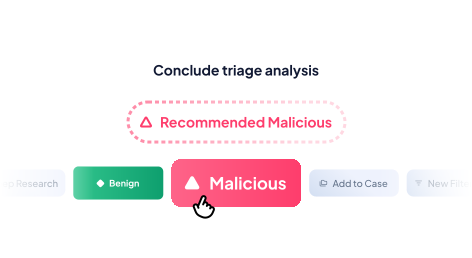
AI provides a transparent verdict by weighing malicious indicators against benign ones. Once analysts review and validate the reasoning of escalated alerts, they can group related alerts into a case, where they can view the full threat picture and take action from a single place.
Classification
AI interprets the characteristics of a raw alert to determine it’s type of threat, and understand whether it has encountered it before. This determines if a plan will be re-used or generated from scratch in step 3.
Enrich
AI automatically pulls in context from across your environment: threat intelligence, identity data, asset information, and more, so your team has everything they need to make a decision without manually stitching data together.
Plan
AI plans the structured set of steps that determines exactly how the alert will be investigated. Plans are built dynamically based on: Radiant’s expert knowledge, your unique environment, and context memory.
Execute
AI runs automatically to answer each investigative question, pulling information from your connected security tools, SIEMs, and external data sources without any manual effort from your analysts.
Conclude
AI provides a transparent verdict by weighing malicious indicators against benign ones. Once analysts review and validate the reasoning of escalated alerts, they can group related alerts into a case, where they can view the full threat picture and take action from a single place.
The output for analysts: What you see
See how we deliver the details that matter the most once triage is completed.
Click through to see examples of each alert type.
Recommended Malicious
Suspicious VPN login bypassed MFA on registered device
Escalate to Case
Classification
Anomalous VPN Login
Employee’s account was accessed from an unfamiliar location behind a consumer VPN — MFA challenges failed three times, and no ZTNA client was found on their registered device.
Classification
Anomalous VPN Login
Employee’s account was accessed from an unfamiliar location behind a consumer VPN — MFA challenges failed three times, and no ZTNA client was found on their registered device.
Planning and Execution
AI triage findings
Is the login IP associated with a VPN or anonymizing service?
The IP resolves to an ExpressVPN exit node in Iceland — absent from this user’s entire login history.
Did the user successfully complete MFA during this login?
MFA failed three times — session access was granted via a legacy authentication fallback policy.
Is a VPN client installed on the user’s registered endpoint?
No VPN client is installed on the registered device — confirming the VPN traffic originated elsewhere.
Enrichment
Involved artifacts
srodriguez@blastlabs.com
authenticated via desktop browser
Remote Azure AD — MFA: Failed
originating from commercial VPN exit node
104.223.87.34 (Reykjavik, Iceland)
flagged against registered device baseline
srodriguez-DELL-WIN11
with prior clean login pattern from expected location
76.102.44.19 (Austin, Texas)
Response
Take action
Suspend user account
Microsoft Entra ID
Terminate active sessions
Microsoft Entra ID
Force MFA re-enrollment
Microsoft Entra ID
Recommended Malicious
Suspicious VPN login bypassed MFA on registered device
Escalate to Case
Classification
Anomalous VPN Login
Employee’s account was accessed from an unfamiliar location behind a consumer VPN — MFA challenges failed three times, and no ZTNA client was found on their registered device.
Classification
Anomalous VPN Login
Employee’s account was accessed from an unfamiliar location behind a consumer VPN — MFA challenges failed three times, and no ZTNA client was found on their registered device.
Planning and Execution
AI triage findings
Is the login IP associated with a VPN or anonymizing service?
The IP resolves to an ExpressVPN exit node in Iceland — absent from this user’s entire login history.
Did the user successfully complete MFA during this login?
MFA failed three times — session access was granted via a legacy authentication fallback policy.
Is a VPN client installed on the user’s registered endpoint?
No VPN client is installed on the registered device — confirming the VPN traffic originated elsewhere.
Enrichment
Involved artifacts
srodriguez@blastlabs.com
authenticated via desktop browser
Remote Azure AD — MFA: Failed
originating from commercial VPN exit node
104.223.87.34 (Reykjavik, Iceland)
flagged against registered device baseline
srodriguez-DELL-WIN11
with prior clean login pattern from expected location
76.102.44.19 (Austin, Texas)
Response
Take action
Suspend user account
Microsoft Entra ID
Terminate active sessions
Microsoft Entra ID
Force MFA re-enrollment
Microsoft Entra ID
Recommended Malicious
Suspicious VPN login bypassed MFA on registered device
Escalate to Case
Classification
Anomalous VPN Login
Employee’s account was accessed from an unfamiliar location behind a consumer VPN — MFA challenges failed three times, and no ZTNA client was found on their registered device.
Classification
Anomalous VPN Login
Employee’s account was accessed from an unfamiliar location behind a consumer VPN — MFA challenges failed three times, and no ZTNA client was found on their registered device.
Planning and Execution
AI triage findings
Is the login IP associated with a VPN or anonymizing service?
The IP resolves to an ExpressVPN exit node in Iceland — absent from this user’s entire login history.
Did the user successfully complete MFA during this login?
MFA failed three times — session access was granted via a legacy authentication fallback policy.
Is a VPN client installed on the user’s registered endpoint?
No VPN client is installed on the registered device — confirming the VPN traffic originated elsewhere.
Enrichment
Involved artifacts
srodriguez@blastlabs.com
authenticated via desktop browser
Remote Azure AD — MFA: Failed
originating from commercial VPN exit node
104.223.87.34 (Reykjavik, Iceland)
flagged against registered device baseline
srodriguez-DELL-WIN11
with prior clean login pattern from expected location
76.102.44.19 (Austin, Texas)
Response
Take action
Suspend user account
Microsoft Entra ID
Terminate active sessions
Microsoft Entra ID
Force MFA re-enrollment
Microsoft Entra ID
Recommended Malicious
Suspicious VPN login bypassed MFA on registered device
Escalate to Case
Classification
Anomalous VPN Login
Employee’s account was accessed from an unfamiliar location behind a consumer VPN — MFA challenges failed three times, and no ZTNA client was found on their registered device.
Classification
Anomalous VPN Login
Employee’s account was accessed from an unfamiliar location behind a consumer VPN — MFA challenges failed three times, and no ZTNA client was found on their registered device.
Planning and Execution
AI triage findings
Is the login IP associated with a VPN or anonymizing service?
The IP resolves to an ExpressVPN exit node in Iceland — absent from this user’s entire login history.
Did the user successfully complete MFA during this login?
MFA failed three times — session access was granted via a legacy authentication fallback policy.
Is a VPN client installed on the user’s registered endpoint?
No VPN client is installed on the registered device — confirming the VPN traffic originated elsewhere.
Enrichment
Involved artifacts
srodriguez@blastlabs.com
authenticated via desktop browser
Remote Azure AD — MFA: Failed
originating from commercial VPN exit node
104.223.87.34 (Reykjavik, Iceland)
flagged against registered device baseline
srodriguez-DELL-WIN11
with prior clean login pattern from expected location
76.102.44.19 (Austin, Texas)
Response
Take action
Suspend user account
Microsoft Entra ID
Terminate active sessions
Microsoft Entra ID
Force MFA re-enrollment
Microsoft Entra ID
Recommended Malicious
Suspicious VPN login bypassed MFA on registered device
Escalate to Case
Classification
Anomalous VPN Login
Employee’s account was accessed from an unfamiliar location behind a consumer VPN — MFA challenges failed three times, and no ZTNA client was found on their registered device.
Classification
Anomalous VPN Login
Employee’s account was accessed from an unfamiliar location behind a consumer VPN — MFA challenges failed three times, and no ZTNA client was found on their registered device.
Planning and Execution
AI triage findings
Is the login IP associated with a VPN or anonymizing service?
The IP resolves to an ExpressVPN exit node in Iceland — absent from this user’s entire login history.
Did the user successfully complete MFA during this login?
MFA failed three times — session access was granted via a legacy authentication fallback policy.
Is a VPN client installed on the user’s registered endpoint?
No VPN client is installed on the registered device — confirming the VPN traffic originated elsewhere.
Enrichment
Involved artifacts
srodriguez@blastlabs.com
authenticated via desktop browser
Remote Azure AD — MFA: Failed
originating from commercial VPN exit node
104.223.87.34 (Reykjavik, Iceland)
flagged against registered device baseline
srodriguez-DELL-WIN11
with prior clean login pattern from expected location
76.102.44.19 (Austin, Texas)
Response
Take action
Suspend user account
Microsoft Entra ID
Terminate active sessions
Microsoft Entra ID
Force MFA re-enrollment
Microsoft Entra ID
Recommended Malicious
Suspicious VPN login bypassed MFA on registered device
Escalate to Case
Classification
Anomalous VPN Login
Employee’s account was accessed from an unfamiliar location behind a consumer VPN — MFA challenges failed three times, and no ZTNA client was found on their registered device.
Classification
Anomalous VPN Login
Employee’s account was accessed from an unfamiliar location behind a consumer VPN — MFA challenges failed three times, and no ZTNA client was found on their registered device.
Planning and Execution
AI triage findings
Is the login IP associated with a VPN or anonymizing service?
The IP resolves to an ExpressVPN exit node in Iceland — absent from this user’s entire login history.
Did the user successfully complete MFA during this login?
MFA failed three times — session access was granted via a legacy authentication fallback policy.
Is a VPN client installed on the user’s registered endpoint?
No VPN client is installed on the registered device — confirming the VPN traffic originated elsewhere.
Enrichment
Involved artifacts
srodriguez@blastlabs.com
authenticated via desktop browser
Remote Azure AD — MFA: Failed
originating from commercial VPN exit node
104.223.87.34 (Reykjavik, Iceland)
flagged against registered device baseline
srodriguez-DELL-WIN11
with prior clean login pattern from expected location
76.102.44.19 (Austin, Texas)
Response
Take action
Suspend user account
Microsoft Entra ID
Terminate active sessions
Microsoft Entra ID
Force MFA re-enrollment
Microsoft Entra ID
Recommended Malicious
Suspicious VPN login bypassed MFA on registered device
Escalate to Case
Classification
Anomalous VPN Login
Employee’s account was accessed from an unfamiliar location behind a consumer VPN — MFA challenges failed three times, and no ZTNA client was found on their registered device.
Classification
Anomalous VPN Login
Employee’s account was accessed from an unfamiliar location behind a consumer VPN — MFA challenges failed three times, and no ZTNA client was found on their registered device.
Planning and Execution
AI triage findings
Is the login IP associated with a VPN or anonymizing service?
The IP resolves to an ExpressVPN exit node in Iceland — absent from this user’s entire login history.
Did the user successfully complete MFA during this login?
MFA failed three times — session access was granted via a legacy authentication fallback policy.
Is a VPN client installed on the user’s registered endpoint?
No VPN client is installed on the registered device — confirming the VPN traffic originated elsewhere.
Enrichment
Involved artifacts
srodriguez@blastlabs.com
authenticated via desktop browser
Remote Azure AD — MFA: Failed
originating from commercial VPN exit node
104.223.87.34 (Reykjavik, Iceland)
flagged against registered device baseline
srodriguez-DELL-WIN11
with prior clean login pattern from expected location
76.102.44.19 (Austin, Texas)
Response
Take action
Suspend user account
Microsoft Entra ID
Terminate active sessions
Microsoft Entra ID
Force MFA re-enrollment
Microsoft Entra ID
Recommended Malicious
Suspicious VPN login bypassed MFA on registered device
Escalate to Case
Classification
Anomalous VPN Login
Employee’s account was accessed from an unfamiliar location behind a consumer VPN — MFA challenges failed three times, and no ZTNA client was found on their registered device.
Classification
Anomalous VPN Login
Employee’s account was accessed from an unfamiliar location behind a consumer VPN — MFA challenges failed three times, and no ZTNA client was found on their registered device.
Planning and Execution
AI triage findings
Is the login IP associated with a VPN or anonymizing service?
The IP resolves to an ExpressVPN exit node in Iceland — absent from this user’s entire login history.
Did the user successfully complete MFA during this login?
MFA failed three times — session access was granted via a legacy authentication fallback policy.
Is a VPN client installed on the user’s registered endpoint?
No VPN client is installed on the registered device — confirming the VPN traffic originated elsewhere.
Enrichment
Involved artifacts
srodriguez@blastlabs.com
authenticated via desktop browser
Remote Azure AD — MFA: Failed
originating from commercial VPN exit node
104.223.87.34 (Reykjavik, Iceland)
flagged against registered device baseline
srodriguez-DELL-WIN11
with prior clean login pattern from expected location
76.102.44.19 (Austin, Texas)
Response
Take action
Suspend user account
Microsoft Entra ID
Terminate active sessions
Microsoft Entra ID
Force MFA re-enrollment
Microsoft Entra ID
Recommended Malicious
Suspicious VPN login bypassed MFA on registered device
Escalate to Case
Classification
Anomalous VPN Login
Employee’s account was accessed from an unfamiliar location behind a consumer VPN — MFA challenges failed three times, and no ZTNA client was found on their registered device.
Classification
Anomalous VPN Login
Employee’s account was accessed from an unfamiliar location behind a consumer VPN — MFA challenges failed three times, and no ZTNA client was found on their registered device.
Planning and Execution
AI triage findings
Is the login IP associated with a VPN or anonymizing service?
The IP resolves to an ExpressVPN exit node in Iceland — absent from this user’s entire login history.
Did the user successfully complete MFA during this login?
MFA failed three times — session access was granted via a legacy authentication fallback policy.
Is a VPN client installed on the user’s registered endpoint?
No VPN client is installed on the registered device — confirming the VPN traffic originated elsewhere.
Enrichment
Involved artifacts
srodriguez@blastlabs.com
authenticated via desktop browser
Remote Azure AD — MFA: Failed
originating from commercial VPN exit node
104.223.87.34 (Reykjavik, Iceland)
flagged against registered device baseline
srodriguez-DELL-WIN11
with prior clean login pattern from expected location
76.102.44.19 (Austin, Texas)
Response
Take action
Suspend user account
Microsoft Entra ID
Terminate active sessions
Microsoft Entra ID
Force MFA re-enrollment
Microsoft Entra ID
Recommended Malicious
Suspicious VPN login bypassed MFA on registered device
Escalate to Case
Classification
Anomalous VPN Login
Employee’s account was accessed from an unfamiliar location behind a consumer VPN — MFA challenges failed three times, and no ZTNA client was found on their registered device.
Classification
Anomalous VPN Login
Employee’s account was accessed from an unfamiliar location behind a consumer VPN — MFA challenges failed three times, and no ZTNA client was found on their registered device.
Planning and Execution
AI triage findings
Is the login IP associated with a VPN or anonymizing service?
The IP resolves to an ExpressVPN exit node in Iceland — absent from this user’s entire login history.
Did the user successfully complete MFA during this login?
MFA failed three times — session access was granted via a legacy authentication fallback policy.
Is a VPN client installed on the user’s registered endpoint?
No VPN client is installed on the registered device — confirming the VPN traffic originated elsewhere.
Enrichment
Involved artifacts
srodriguez@blastlabs.com
authenticated via desktop browser
Remote Azure AD — MFA: Failed
originating from commercial VPN exit node
104.223.87.34 (Reykjavik, Iceland)
flagged against registered device baseline
srodriguez-DELL-WIN11
with prior clean login pattern from expected location
76.102.44.19 (Austin, Texas)
Response
Take action
Suspend user account
Microsoft Entra ID
Terminate active sessions
Microsoft Entra ID
Force MFA re-enrollment
Microsoft Entra ID
Recommended Malicious
Suspicious VPN login bypassed MFA on registered device
Escalate to Case
Classification
Anomalous VPN Login
Employee’s account was accessed from an unfamiliar location behind a consumer VPN — MFA challenges failed three times, and no ZTNA client was found on their registered device.
Classification
Anomalous VPN Login
Employee’s account was accessed from an unfamiliar location behind a consumer VPN — MFA challenges failed three times, and no ZTNA client was found on their registered device.
Planning and Execution
AI triage findings
Is the login IP associated with a VPN or anonymizing service?
The IP resolves to an ExpressVPN exit node in Iceland — absent from this user’s entire login history.
Did the user successfully complete MFA during this login?
MFA failed three times — session access was granted via a legacy authentication fallback policy.
Is a VPN client installed on the user’s registered endpoint?
No VPN client is installed on the registered device — confirming the VPN traffic originated elsewhere.
Enrichment
Involved artifacts
srodriguez@blastlabs.com
authenticated via desktop browser
Remote Azure AD — MFA: Failed
originating from commercial VPN exit node
104.223.87.34 (Reykjavik, Iceland)
flagged against registered device baseline
srodriguez-DELL-WIN11
with prior clean login pattern from expected location
76.102.44.19 (Austin, Texas)
Response
Take action
Suspend user account
Microsoft Entra ID
Terminate active sessions
Microsoft Entra ID
Force MFA re-enrollment
Microsoft Entra ID
Recommended Malicious
Suspicious VPN login bypassed MFA on registered device
Escalate to Case
Classification
Anomalous VPN Login
Employee’s account was accessed from an unfamiliar location behind a consumer VPN — MFA challenges failed three times, and no ZTNA client was found on their registered device.
Classification
Anomalous VPN Login
Employee’s account was accessed from an unfamiliar location behind a consumer VPN — MFA challenges failed three times, and no ZTNA client was found on their registered device.
Planning and Execution
AI triage findings
Is the login IP associated with a VPN or anonymizing service?
The IP resolves to an ExpressVPN exit node in Iceland — absent from this user’s entire login history.
Did the user successfully complete MFA during this login?
MFA failed three times — session access was granted via a legacy authentication fallback policy.
Is a VPN client installed on the user’s registered endpoint?
No VPN client is installed on the registered device — confirming the VPN traffic originated elsewhere.
Enrichment
Involved artifacts
srodriguez@blastlabs.com
authenticated via desktop browser
Remote Azure AD — MFA: Failed
originating from commercial VPN exit node
104.223.87.34 (Reykjavik, Iceland)
flagged against registered device baseline
srodriguez-DELL-WIN11
with prior clean login pattern from expected location
76.102.44.19 (Austin, Texas)
Response
Take action
Suspend user account
Microsoft Entra ID
Terminate active sessions
Microsoft Entra ID
Force MFA re-enrollment
Microsoft Entra ID
What security leaders say?